¶ Chat Commands
Chat commands are typed into the chat bar and proceeded by a slash /. They are used to provide information and access game features. To view chat commands in game, type /help
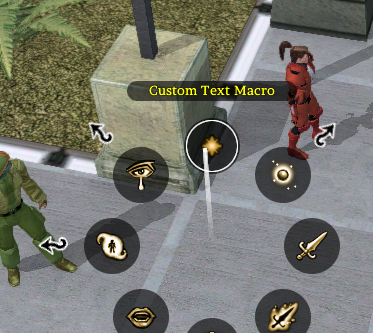
Chat commands you intend to use often or need access to quickly can be placed in the hotbar. Right click on the desired slot, then at the top of the radial menu, select Custom Text Macro. You will be prompted to enter a label. This can be anything to help you remember what the slot is for. Next you will be prompted to enter the command. Enter the desired chat command in the correct format.
¶ Chat Commands
The following is a list of in game chat commands:
/a: Alias of /associate — makes your associate (droid, pet, etc.) speak a message.
/alwayswalk: Toggles forced walking when moving your character.
/associate: Makes your associate (droid, pet, etc.) speak a message.
/bug: Toggles the bug report window to submit bugs to the developers. Please include as much detail as possible.
/cdkey: Displays your public CD key.
/desc, /description: Opens the description editor for a targeted item in your inventory (DMs may target other object types). Target the item, then use the command.
/char: Displays your character's info.
/character: Displays your character's info.
/conc: Tells you what concentration ability you have active. Follow with 'end' (no quotes) to turn your concentration ability off. Example: /concentration end
/concentration: Tells you what concentration ability you have active. Follow with 'end' (no quotes) to turn your concentration ability off. Example: /concentration end
/coord: Displays your current coordinates in the area.
/customise: Opens the appearance editor window.
/customize: Opens the appearance editor window.
/delete: Permanently deletes your character. You must use /delete <YourPublicCDKey> (use /cdkey to see your key). Enter the same command a second time within 30 seconds to confirm.
/dice: Opens the dice bag menu. Public dice-based RP, PvP, event, warzone, and squadron systems are documented on the Dice Rolls page.
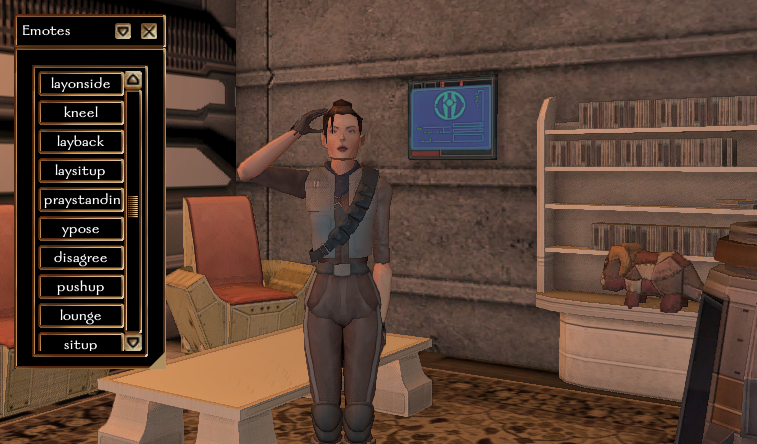
/emotegui: Displays the Emotes window.
/emotes: Displays all emotes available to you.
/emotesgui: Displays the Emotes window.
/emotestyle: Toggles your emote style between regular and novel. (Novel requires spoken words to be placed in quotations. Everything else will be displayed in green text.)
/endcall: Ends an active HoloCom call, cancels an outgoing call attempt, or clears stuck call state.
/exit: Exits the pilot seat when controlling a starship. Cannot be used while you are targeted in space combat.
/follow: Makes you follow a selected target.
/help: Displays all chat commands available to you.
/language: Switches the active language. Use /language help for more information.
/name <label>: Target another player to save a private label only your character can see. To set your normal identity's gray public descriptor, type /name A Weathered Human (using your own description), then click your own character when the target cursor appears. Self-targeted /name changes your normal descriptor even while disguised; it does not replace the disguise's saved descriptor. For a disguise, edit its Public Description field in the Disguises window and click Save. Labels and descriptions are limited to 64 characters and cannot include color codes. See Disguises for examples and what other players see.
/forgetname: Target a character to remove only your private label for that presented identity.
/introduce <name>: Offers a name or alias to players within 20 meters who can see you. It has a 5-minute cooldown that persists across reconnects. Offers expire after 10 minutes and become unavailable if you disconnect or change identity.
/introductions: Reviews offered names so you can Remember or Dismiss them. Nothing is saved without approval, and replacing an existing private label requires confirmation. See the Player Guide communication article for examples and identity rules.
/perk: Toggles the perks menu.
/perks: Toggles the perks menu.
/pos: Displays your current position in the area.
/recipe: Toggles the recipes menu.
/recipes: Toggles the recipes menu.
/rename: Opens the rename window for the targeted item (players); DMs may use it on additional target types.
/ordercompanion, /order, /oc: Orders your companion to interact with the target (attack enemies or placeables, open unlocked doors). Use on your henchman to cancel their actions.
/resetwindows: Closes open UI windows and resets all window positions and sizes to defaults.
/skills: Toggles the skills menu.
/stuck: Emergency escape. Teleports you to this area’s STUCK_WAYPOINT if one exists; otherwise falls back to a server default waypoint or the nearest waypoint. You may only use this once every 30 minutes.
/time: Returns the current UTC server time and the in-game time.
/walk: Same as /alwayswalk — toggles forced walking when moving your character.
DMs and admins see additional commands in /help (for example /tpwp, /copyitem, /rez, /spawngold). On the public test server, some DM commands are also available to players for testing. See the DM handbook for teleport tools.

Emotes
¶ In game emote chat commands:
For looping emotes, you can optionally add a number after the command to set how long the animation runs in seconds (for example /sit 30). If omitted, a long default duration is used.
/bootdance: Play a boot dance animation.
/dig: Plays a dig animation.
/bored: Plays a bored animation.
/bow: Plays a bow animation.
/cheerloud: Cheer loudly.
/clap: Play a clap animation.
/classicjedistance: Get in the classic Jedi stance.
/cower: Plays a cower animation.
/crossarms: Plays a cross arms animation.
/crouch: Plays a crouch animation.
/dancehandsup: Dance with your hands held high.
/deadback: Plays a dead back animation.
/deadfront: Plays a dead front animation.
/dejectedkneel: Kneel dejectedly.
/disagree: Plays a disagree animation.
/doublelsstance: Hold your lightsaber behind you.
/drink: Drink it up.
/drunk: Plays a drunk animation.
/dualwieldingstance: Take a combat stance with two weapons.
/dualwieldingstance2: Take a combat stance with two weapons.
/duck: Plays a duck animation.
/facepalm: Play a facepalm animation.
/fetal: Play a fetal position animation.
/flex: Play a flex animation.
/followme: Plays a follow-me animation.
/greet: Plays a greet animation.
/hangbyhands: Plays a hanging by hands animation.
/hug: Play a male/female hug dependent on gender.
/interact: Plays an interact animation.
/jedihandsonback: Place hands behind back like a Jedi.
/jumpforward: Plays a jump animation.
/jumpingjacks: Play a jumping jack animation.
/kiss: Play a male/female kiss dependent on gender.
/kneel: Plays a kneel animation.
/kneeup: Play a knee up animation.
/laughing: Plays a laughing animation.
/layback: Lay partially back, hands on stomach.
/laydownfaceforward: Lay down, face forward.
/layheadonside: Lay to the side.
/layonside: Plays a lay on the side animation.
/laysitup: Plays a lay on back partially upright animation.
/listen: Plays a listen animation.
/look: Plays a look far animation.
/lounge: Play a lounge animation.
/meditate: Plays a meditate animation.
/onehandedstance: One handed melee stance.
/paraderest: Play a parade rest animation.
/pickup: Play a pickup animation.
/playflute: Play a flute animation.
/playguitar: Play a guitar animation.
/point: Plays a point animation.
/pointpistol: Point your pistol.
/praystanding: Plays a praying animation standing up.
/prisoner: Play a prisoner with hands behind back animation.
/push: Play a push animation.
/pushup: Play a push up animation.
/read: Plays a read animation.
/salute: Play a salute animation.
/scratchhead: Plays a scratch head animation.
/shieldwall: Take a shield stance.
/shrug: Shrug
/sidestep: Plays a side-step animation.
/sit: Makes your character sit down.
/sitcrossed: Sit, legs crossed.
/sitspread: Sit, legs spread.
/situp: Play a sit-up animation.
/smoke: Smoke it up.
/spasm: Plays a spasm animation.
/squat: Play a squat animation.
/taunt: Plays a taunt animation.
/think: Plays a think animation.
/tired: Plays a tired animation.
/victory1: Plays a victory 1 animation.
/victory2: Plays a victory 2 animation.
/victory3: Plays a victory 3 animation.
/wallfoot: Play a lean back on wall, foot up animation.
/waltz: Play a male/female waltz dependent on gender.
/ypose: Hold arms up in a Y shape.
¶ Languages
Use the following behind the /language command. For example /language catharese
basic
bothese
catharese
cheunh
dosh
droidspeak
ewokese, or yubnub
huttese
keldor
mandoa
mirialan
moncalamarian, or moncal
nautilan
rodese, or rodian
shyriiwook, or wookiespeak
togruti
twileki, or ryl
ugnaught
zabraki, or zabrak